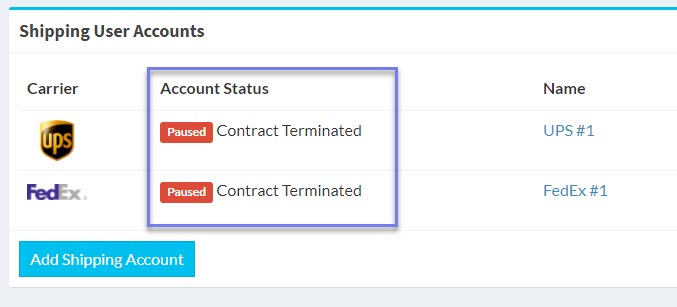
The intent of this article is to provide details about a customer with Account Status: Contract Terminated
Shipping User Accounts view (Customer view)
Overview
A paused account due to Contract Terminated means the customer has closed their account with the auditing platform. This action can be performed by a Merchant Admin or the customer.
Terminate from inside the Merchant Admin dashboard
Steps
Sign into Merchant Admin account
Tap Users on the left sidebar
Tap the pencil icon to edit target User
Within User detail view, set Enabled field to No (see Figure 1 below)
Within User detail view, scroll down to Shipping Accounts card and tap the pencil icon to edit
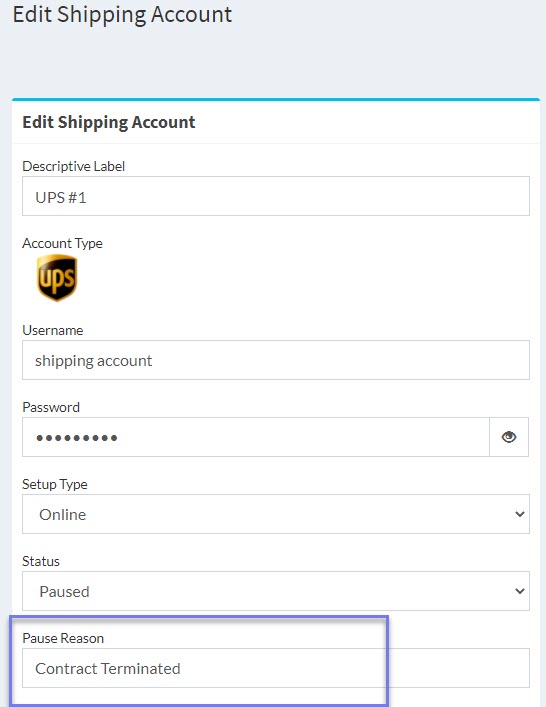
Within Edit Shipping Account card, manually type “Contract Terminated” into Pause Reason field (see Figure 2 below)
Figure 1. User detail view
Figure 2. Edit Shipping Account
Terminate from inside the customer dashboard
A customer has the ability to terminate from the customer dashboard. This can be done within the settings menu of the customer dashboard. When this occurs, the user account is moved to enabled = N and the status of all activities on all shipping accounts are set to paused.
The notification email recipients listed for your merchant account will receive an email immediately when this occurs.
Customer terminated. Now what?
If the customer decides to return to the platform, you can re-enable the account at any time within the User Detail view by setting Enabled field to Yes.