Use Postman to call the Optimum Parcel API

Just getting started?

Find instructions specific to obtaining authentication credentials to the Optimum Parcel API within the developer section of this help center.

Making the connection

Get started with using Postman to send and receive through the Optimum Parcel API with the following steps:

1. Launch Postman

Both the native application and the browser extension have been tested and work for the example below.

2. Specify the endpoint

Direct customer user type

				
					https://api.optimumparcel.com


Reseller customer user type

				
					https://api.optimumparcel.com


Note: Explore methods within the API Docs .

3. Input the required headers

A minimum of two Headers are required to make a request of any type.
Header: Content Type
Key: Content-Type
Value: application/json

Header: x-api-key
Key: x-api-key
Value: YOUR-API-KEY

Your API Key

API keys are unique and available upon request. More information on obtaining an API Key is available within the Developer area of the Optimum Parcel help center.

Use postman image1 svg
The figure above showcases the location within Postman to enter the required Header values defined in this section.

4. Add body for an example request

For post request types, required parameters are made in json format.
				
					{
"tracking_number": "775635651223"
}
				
			
The figure above. showcase the raw body input and associated parameters required.

Tracking number for testing

Access to shipping accounts and related tracking numbers are specific to your account and the privileges defined by user type. Ensure that you’re using a valid tracking number that’s available within your Optimum Parcel account.

5. Send request

Tap the send button to submit the post request provided in this example.

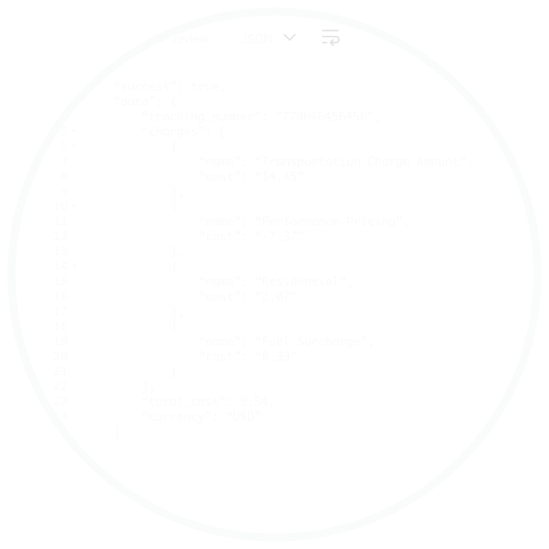
6. Read the response

Use postman image3 svg
The figure above showcases an example reponse for the shipping price method.

Exception handling

Invalid access key

Ensure that the access key matches the values defined for your account, and that the requested endpoint is indeed valid.

403 forbidden

Ensure the URL used in making the request, is valid for the your user type.

Missing parameter required

Ensure that formatting of the body input is valid json and matches the parameters defined for the method requested.
Share this post
Facebook
LinkedIn
Twitter
Email

Tap to start product tour